Interrupted recording
The device stopped before the MP4 file could be finalized correctly.
Windows app · MP4 recovery · AVC/H.264
Lost doesn't always mean gone.
Recover damaged MP4 recordings by rebuilding supported structures and recovering valid AVC/H.264 video whenever possible.
The app is approved for Microsoft Store. Public release is being coordinated with its product page and Full upgrade.

The problem
An interrupted recording, sudden power loss, battery removal or damaged storage can leave an MP4 file unreadable even when much of its video data remains intact.
REC(over) examines what is still valid before deciding how the file should be recovered.
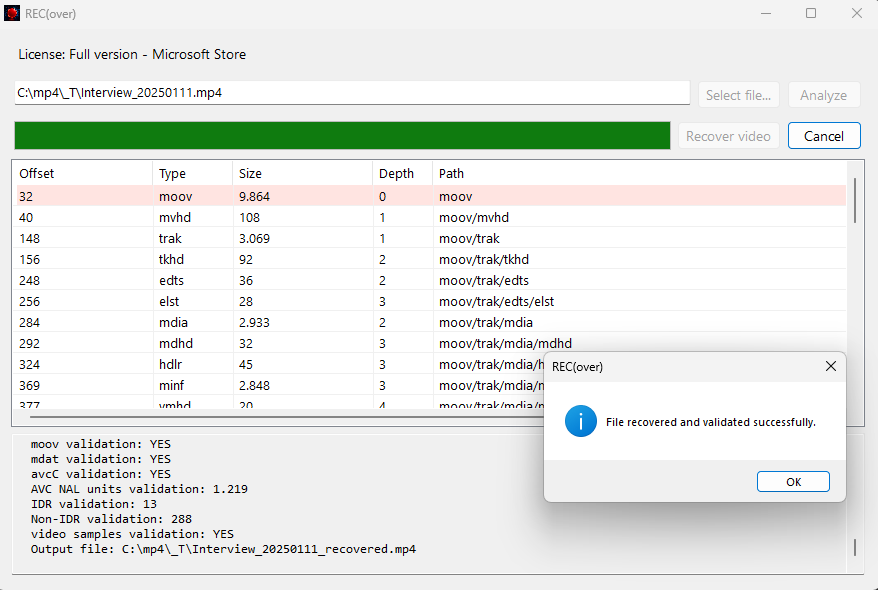
Analyze before you recover
REC(over) inspects the MP4 container, AVC/H.264 configuration, media samples, NAL units, IDR frames, reference dependencies and supported fragmented MP4 structures.
Only after the analysis does it select an appropriate recovery strategy and create a separate output file.
Designed for situations like these
The device stopped before the MP4 file could be finalized correctly.
The recording ended suddenly because the camera or recorder lost power.
Required MP4 initialization structures were not completely written.
The recording still exists, but part of the MP4 structure became unreadable.
How REC(over) works
Capabilities
mdat repair strategies.Trial and Full
The Trial performs the same complete analysis as Full, but produces a short sample instead of the entire recovered file.
| Feature | Trial | Full |
|---|---|---|
| Complete file analysis | Yes | Yes |
| Recovery report | Yes | Yes |
| 10-second recoverable sample | Yes | No |
| Complete recovery | No | Yes |
Safe by design
REC(over) never overwrites the source file. Recovered content is written to a new output file selected by the user.
All analysis and recovery are performed locally on the Windows computer. Files are not uploaded to tioleo servers.
Current support
HEVC/H.265 and additional container formats are not supported in version 1.0.
FAQ
No. Recovery depends on how much valid structure and media data remain available.
Never. It creates a separate recovered output file.
It lets you verify the recovery result before purchasing Full.
Only for Microsoft Store licensing and purchase validation. File processing is local.
Microsoft Store
REC(over) has been approved for Microsoft Store. The public link will be added here when the coordinated release is enabled.
Support
For REC(over) support, questions or suggestions, contact: